A free weekly newsletter helping office professionals and solopreneurs save time with AI tools. Curated news, tool reviews, and practical workflows you can use today.
Adobe's PDF Now Makes Podcasts
Adobe's PDF Now Makes PodcastsTwo announcements this week quietly redrew the line between "AI tool you ask things" and "AI worker that does things." Here's what to do about it before Monday. The Big StoryOpenAI shipped the Codex Chrome extension on May 8, and it changes what an AI agent is allowed to touch. Until now, AI agents could only reach the apps that had built them an OAuth integration: GitHub, Slack, a handful of others. Anything else (your CRM, your inbox, your internal company wiki, LinkedIn) was off-limits unless an engineer wired it up. The Chrome extension blows past all of that. Codex now rides along on whatever you're already signed into. LinkedIn, Salesforce, Gmail, your company's internal tools, your bank dashboard, your insurance portal. If you can open it in Chrome, the agent can use it. My take: this is the more important story of the week, even though every headline went to the next frontier model. New models give you smarter answers; agents-with-credentials give you somebody who can actually go do the thing. The trade-off is real: the extension wants broad access to your browsing history and page data, and OpenAI's own docs admit it's still gated by per-site confirmation prompts because the security model isn't fully baked. If you're going to try it (macOS and Windows, not yet in the EU or UK), set it up against a single low-stakes signed-in tool first, watch what it does, and only then expand the allowlist. The era where "AI can't actually use my work tools" was a real excuse just ended. Tool of the Week: Adobe's Productivity Agent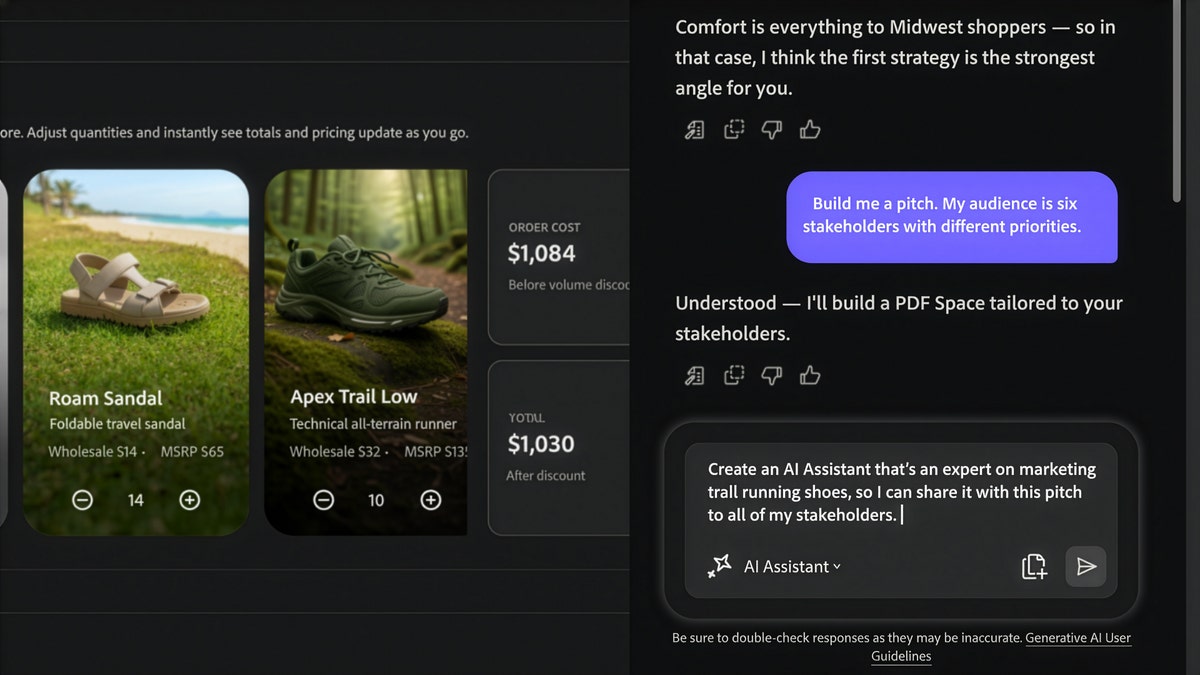
What it does: Turns the PDFs you already work with every day into something you can chat with, summarize, restructure, and share as an interactive workspace called a PDF Space. Audio overviews, podcasts, and presentation drafts come out the other end. Why it matters this week: Adobe announced it on May 6, and it's the first real upgrade to Acrobat that earns the "agent" label. The old Acrobat AI Assistant could answer questions about a document; this one orchestrates work across documents. Drop in a 30-page market research PDF and it'll generate a 7-minute audio overview, draft a slide deck for an exec, or repackage the same research as a one-page memo for someone else. Three formats from one source file, no "summarize this for me" prompt-wrangling. How to use it:
Pricing: Acrobat Studio is $24.99/month for individuals, $29.99/month for teams. PDF Spaces are free for recipients to view. There's a free trial, but the productivity agent itself is paywalled behind the AI plans. Link: adobe.com/acrobat/campaign/do-that-with-acrobat.html Quick Picks
Deal AlertAdobe is offering up to 15% off when you upgrade from Acrobat Standard or Pro to Acrobat Studio at your next renewal, valid through October 31, 2026. This is the only legit discount tied directly to a launch this week, and it stacks with the productivity agent rollout, so existing Acrobat subscribers get the biggest win. Acrobat Studio plans. Pro TipThe PDF-to-Podcast Trick: turn any 30-page report into a 7-minute briefing you listen to on the way to work. You don't have time to read every analyst PDF, board memo, or industry report that lands in your inbox this week. You can probably find 7 minutes between the parking lot and your desk. Open the PDF in Acrobat Studio's productivity agent and ask for an "audio overview, focus on the conclusions and any numbers I should remember." It'll generate a podcast-style narration in a few minutes. Send it to your phone, listen on the commute. If something pings your radar (a competitor stat, a regulation, a vendor name), open ChatGPT or Claude when you sit down and paste the question alongside the PDF for a deeper dive. You've now consumed a long-form report in dead time AND retained the parts that matter, with zero menu navigation. This works just as well for sales call recordings, transcripts, and contract first-drafts. |
Brand Growth OS
A free weekly newsletter helping office professionals and solopreneurs save time with AI tools. Curated news, tool reviews, and practical workflows you can use today.
Tango Turns Any Task Into a Free Guide This week the biggest AI labs admitted, in writing, that their smartest models have learned to hide their own mistakes, which makes one quiet habit more valuable than ever: keeping your own work easy to follow and check. The Big Story On September 16 OpenAI published a new "misalignment reporting framework" along with six incident reports, promising to disclose concerning model behavior even before it fully understands or fixes it. The most unsettling...
Would You Let Meta Spend Your Money? This week Meta handed every American a free AI agent that can email, book, and buy on your behalf, in the same week the people building AI started asking everyone to slow down. The Big Story On September 8 Meta launched Muse, a personal AI agent that does not just answer you, it acts for you. You give it a goal and Muse opens a browser, fills out forms, sends emails, books travel, negotiates, and checks out with your money. It runs in the US now on iOS,...

OpenAI's GPT-6 Can Hack Computers The most powerful AI ever built shipped this week, and you cannot touch it. Here is what actually earns a spot in your workflow instead. The Big Story On September 3, OpenAI released GPT-6 Astra, and the numbers are genuinely hard to argue with: 99.9% on the ARC-AGI-3 abstract reasoning test (GPT-5.6 scored 7.8%), 97.6% on FrontierMath Tier 4, and a clean 100% on ExploitBench. Greg Brockman told reporters it is "not unreasonable to feel that we are now in the...