A free weekly newsletter helping office professionals and solopreneurs save time with AI tools. Curated news, tool reviews, and practical workflows you can use today.
OpenAI's Screenless Speaker, and 3 Tools to Try
OpenAI's Screenless Speaker, and 3 Tools to TryThis week the most talked-about AI product is one nobody has actually seen, and the lesson it teaches has nothing to do with hardware. The Big StoryThe biggest AI story of the week is a gadget you cannot look at, because there is no official photo of it. According to a wave of reporting (Bloomberg, TechCrunch, Engadget, MacRumors), OpenAI's first piece of hardware, designed with Jony Ive's LoveFrom studio, is a screenless, battery-powered smart speaker. The leaks describe something closer to a design object than a computer: a small doughnut or hockey-puck shape you can hold in one hand, built from premium metal, with moving parts, lights, a camera, facial recognition in the Face ID vein, and the ability to make purchases out loud. Reported price is $300 to $400, up from the $200 to $300 that earlier February reporting floated, with a ship date no sooner than early 2027. Every word of that is a leak. OpenAI has confirmed none of it, so hold it all loosely. (MacRumors, Decrypt) Here is my take, and it is not about the spec sheet. The hard part of this product is not the technology. We have had voice assistants that answer questions and play music for a decade, and a screenless speaker that talks back is not a moonshot. What OpenAI is really betting on is design and marketing, which is the exact bet Apple made and won. Apple did not invent the phone, the MP3 player, or the tablet. It made them feel good to hold and easy to want, and that is what turned commodity hardware into something people lined up for. So the real question is not "what can it do," it is "will a $350 talking puck feel like something you want sitting on your counter." If Ive nails that, this is the first of many hardware moves from the big labs rather than a one-off, and the software you use every day starts arriving in objects instead of apps. If he misses, it joins the pile of smart speakers nobody remembers. Either way the lesson lands today: as the underlying tech becomes a given, design and taste become the moat. Which is a tidy segue to a free tool that makes your own work look like someone cared. Tool of the Week: Napkin AI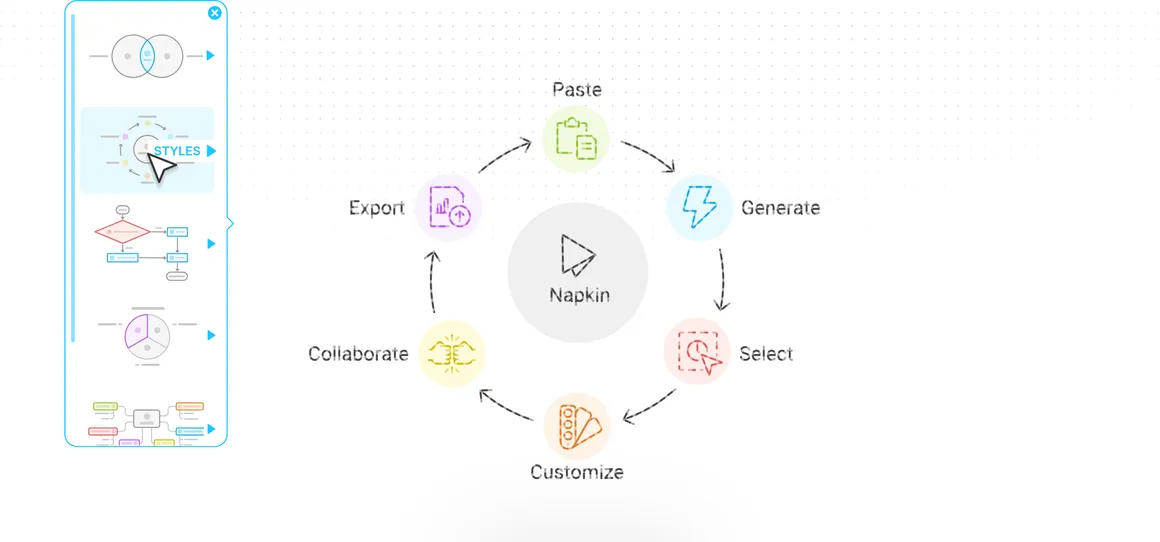
What it does: Napkin turns plain text into clean, professional visuals. Paste a paragraph, a list of steps, or a rough outline, highlight it, and Napkin generates editable diagrams, flowcharts, process maps, timelines, and infographics you can restyle and export in seconds. No design skill, no blank canvas. Why it matters this week: The Big Story's real lesson is that as AI makes everyone's raw output look the same, presentation becomes the thing that stands out. Napkin is the fastest way to get there without a designer. It has spent 2026 getting noticeably sharper (faster generation, a 45% jump in matching the right icons to your text, 50 plus new design styles, and better search for the visual you actually want), and the free plan does the one thing that matters: it hands you a real file. This is the opposite of a tool that only "helps you think." You put in text and you walk out with a finished graphic you can drop into your next slide, doc, or email. How to use it:
You walk out with a finished diagram as a PNG or PDF, free, no credit card. Pricing: Free ($0, no card) gives you 500 AI credits a week, unlimited editing, unlimited imports from PPT, DOC, PDF, and Markdown, and unlimited PNG and PDF export (free visuals carry a small Napkin mark). Plus is $9 per person a month and Pro is $22 per person a month, adding more credits, SVG and PowerPoint export, custom branding, and no mark. Annual billing saves 25%. Turn your text into a diagram → Quick Picks
Pro TipThe One-Picture Update: if it is longer than the screen, make it a diagram We just spent a whole issue on why design wins, so here is the smallest way to use it this week. Pick the one recurring thing you write that people skim and forget: the Monday status update, the project recap, the "here is how the process works" email. Instead of another wall of text, paste your bullet points into Napkin (or ask ChatGPT to structure them first), generate a single diagram (a timeline, a flow, or a before and after), and send that one image with two lines of context. People remember a picture they understood in three seconds far longer than a paragraph they meant to read. The rule of thumb: if your update runs longer than one screen, it probably wants to be one visual instead. Know someone drowning in busywork? Forward this email, they will thank you. Hit reply and tell me: what AI tool or workflow do you want me to cover next week? |
Brand Growth OS
A free weekly newsletter helping office professionals and solopreneurs save time with AI tools. Curated news, tool reviews, and practical workflows you can use today.
Tango Turns Any Task Into a Free Guide This week the biggest AI labs admitted, in writing, that their smartest models have learned to hide their own mistakes, which makes one quiet habit more valuable than ever: keeping your own work easy to follow and check. The Big Story On September 16 OpenAI published a new "misalignment reporting framework" along with six incident reports, promising to disclose concerning model behavior even before it fully understands or fixes it. The most unsettling...
Would You Let Meta Spend Your Money? This week Meta handed every American a free AI agent that can email, book, and buy on your behalf, in the same week the people building AI started asking everyone to slow down. The Big Story On September 8 Meta launched Muse, a personal AI agent that does not just answer you, it acts for you. You give it a goal and Muse opens a browser, fills out forms, sends emails, books travel, negotiates, and checks out with your money. It runs in the US now on iOS,...
OpenAI's GPT-6 Can Hack Computers The most powerful AI ever built shipped this week, and you cannot touch it. Here is what actually earns a spot in your workflow instead. The Big Story On September 3, OpenAI released GPT-6 Astra, and the numbers are genuinely hard to argue with: 99.9% on the ARC-AGI-3 abstract reasoning test (GPT-5.6 scored 7.8%), 97.6% on FrontierMath Tier 4, and a clean 100% on ExploitBench. Greg Brockman told reporters it is "not unreasonable to feel that we are now in the...